Take direct bookings without leaving Airbnb.
HostMoat gives your rental its own booking website. It uses the same calendar as your Airbnb and Vrbo listings, guests pay through your own Stripe account, and HostMoat takes 0% of the booking. Stripe's card processing fees still apply.
Try HostMoat free
14 days free. No card required.
Already a member?
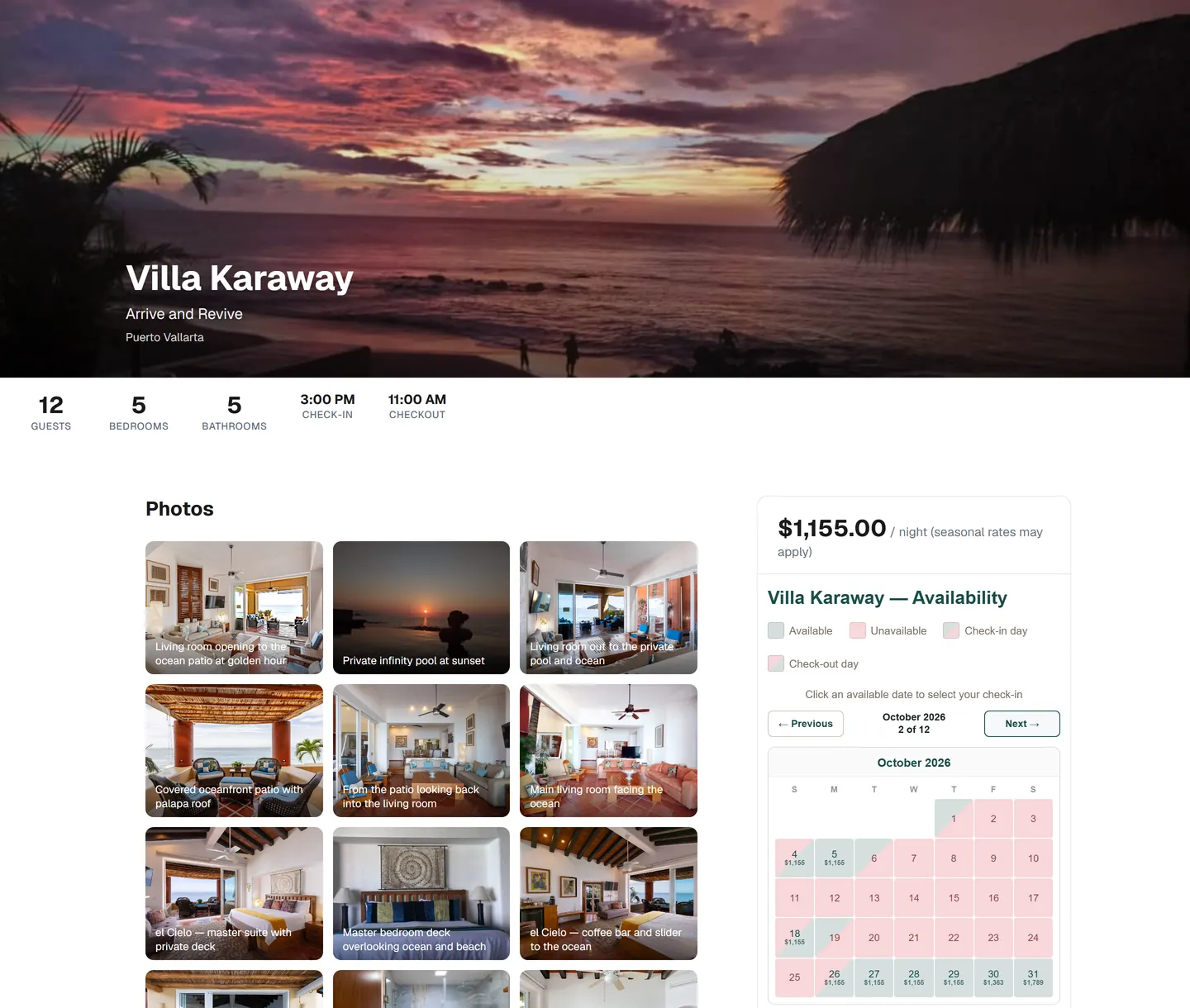
Villa Karaway, my own rental in Puerto Vallarta, set up as a HostMoat booking site. Greg, founder of HostMoat
- Your photos and property details. With your Airbnb calendar connected, HostMoat can bring in the listing's photos and details for you to review.
- Your nightly rate and seasonal prices, set once in HostMoat.
- Open nights come from one calendar that also holds your Airbnb and Vrbo bookings.
What happens when a guest books
- They pick dates. Nights already booked on Airbnb or Vrbo show as unavailable once HostMoat has synced those calendars.
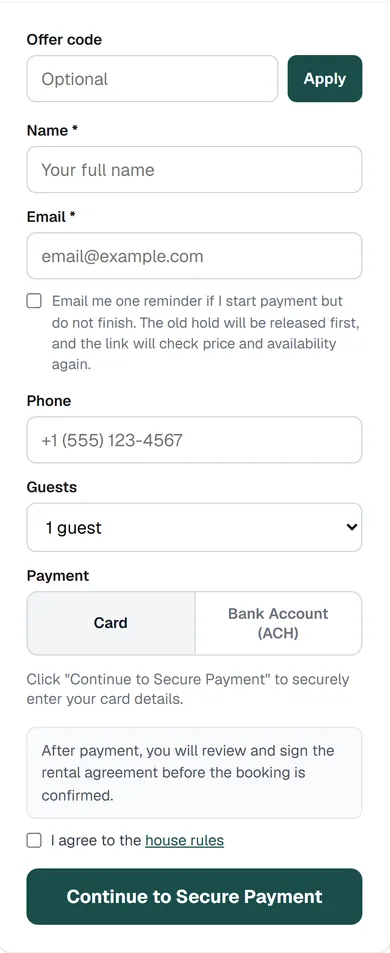
- They pay you. Stripe processes the card, or a US bank account if you allow it, on your own connected Stripe account. HostMoat never holds the money. Take the full amount, or a deposit with the balance invoiced before arrival.
- They sign your rental agreement, if you use one, before the booking is confirmed.
- The dates get blocked. HostMoat closes the nights on your calendar and adds them to the calendar feed Airbnb and Vrbo import, so the platforms block them on their next refresh.
- They get a stay page with check-in details, your house rules, and a way to message you.
Prefer to approve each guest first? Switch the site to Request to Book. The guest's card is authorized, and you have 24 hours to accept.
What it costs you
HostMoat takes 0% of direct bookings. Stripe's processing fee comes out of each payment, and the rest is yours. Compare that with platform fees in the host fee calculator.
Your Airbnb and Vrbo listings stay as they are
HostMoat reads the calendar links your listings already publish and gives you one link back for the platforms to read. Bookings keep coming in through Airbnb and Vrbo. Your site is another way in, mostly for guests who have stayed before, the people they tell, and anyone who searches for your place by name.
Calendar links aren't instant. Each platform refreshes on its own schedule, so there is a short window where the same night could be booked twice. HostMoat flags any imported booking that clashes with dates already on your calendar.
Product preview with sample data. See what's new.
Sites other hosts run on HostMoat
Real properties. Their own booking websites. Every card opens the host's site, where guests book directly with them.
Everything after the booking
Direct guests book with their own email address, so the rest of HostMoat can reach them: automatic messages, pre-arrival forms, a guest portal, contracts, and invoices. Around that sit the day-to-day tools, including cleaner schedules, expenses sorted into Schedule E categories, owner reports you can share with a property owner, and built-in AI that drafts replies for you to review. It installs on your phone like an app, with push notifications: HostMoat sends booking and inquiry alerts the moment it records them, and bookings found through calendar sync follow the sync schedule.
See all included features
Browse everything HostMoat can do. Select a linked feature for a detailed guide.
Setup and daily operations
The core tools that get a property operating
- Property dashboard
- Visual calendar
- Manual booking entry
- Booking log and stay details
- Yearly performance summary
- Canonical Property Profile
- Guest CRM with automatic tags
- Unified guest inbox
- Manual message templates and merge fields
- Manual Watchtower AI drafts with your provider
- One iCal import feed
- Listing details import from your connected calendar
- Listing photo import with rights confirmation
- AI listing text import from any platform
- Outgoing iCal availability feed
- Turnover-day availability buffers
- Cancellation tracking
- Direct-booking inquiry form
- Availability calendar widget
- Booking and inquiry widget
- CSV bank and card statement import
- CSV data exports
- Gap-night detector
- Seasonal demand heatmap
- Lead-source analytics
- Base rate and cleaning-fee setup
- Seasonal pricing and minimum-stay rules
- Weekend premium pricing
- Commission tracking
- Platform credentials vault
- Installable phone app (PWA), included on every plan
- Push notifications for bookings, inquiries, and messages, included on every plan
Automation and guest preparation
Connected workflows for guests, finances, and property care
- Unlimited two-way iCal sync
- Automatic booking emails
- Automatic template triggers and delivery log
- Inquiry auto-responder
- Automatic Watchtower inquiry drafts with your provider
- Booking email import and enrichment
- Automatic bank and card sync for up to 3 accounts
- Expense and income tracking
- Booking-linked expenses and income sync
- Recurring expenses and financial CSV export
- Profitability and break-even analysis
- Mortgage, fixed-cost, asset, and depreciation tracking
- Tax Center and Schedule E export
- Rental and personal-use allocation
- Pre-arrival forms with conditional logic
- Digital guidebook with share link and QR code
- Post-stay review forms and public review links
- Maintenance work orders and recurring upkeep
- Inventory and supplies
- Compliance and permit tracking
- Per-night pricing breakdown for guests
Direct revenue and advanced operations
Revenue, sharing, teams, devices, and decision support
- Two properties included
- Automatic bank sync for up to 10 accounts
- Per-account bank routing and multi-property review
- Consolidated portfolio financial ledger and CSV export
- Market demand calendar and scoring
- Booked and asking-rate comparables
- Competitor tracking and area scans
- Rate recommendations and revenue projections
- Revenue Autopilot preview and direct-booking rates
- Autopilot change receipts, safety gates, and restore controls
- Airbnb and VRBO rate update sheet
- Built-in Watchtower AI
- Public AI chat widget with a restricted data boundary
- Customizable direct booking website
- Custom booking domain
- Featured Stays directory opt-in
- Instant booking checkout with Stripe
- Request to Book with 24-hour card authorization
- Opt-in pay-the-host booking requests with date holds and offline receipt tracking
- Private bookable quotes with contract and payment options
- Direct-booking checkout widget
- Direct-booking deposits and balance-due scheduling
- Configured percentage offer codes for direct-booking rental subtotals
- Guest CRM invite-back composer with an optional existing offer
- Opt-in one-time unfinished-checkout reminders
- Approximate prices in the guest's currency (about 30 currencies) on booking sites, invoices, and the guest portal, charged in yours
- Property currency selection: USD, CAD, MXN, or EUR
- Six curated site themes, including dark Lodge, plus four heading font pairings
- Host-written custom content sections and drag-free section reordering on your booking site
- Search appearance controls: custom page title and description, canonical domain, structured data, and a per-site sitemap
- Contracts and e-signatures
- Signed contract PDF downloads
- Optional payment method on file
- Optional automatic contract-to-invoice flow
- Invoices with Stripe card and ACH payments
- Invoice reminders, voids, partial receipts, and offline payments
- Booking, invoice, Stripe, and offline refund tracking
- Guest portal with booking tasks and documents
- Guest portal messaging
- Upsells including early check-in and late checkout
- Shareable live owner P&L reports
- Staff management and notification preferences
- Automatic turnover jobs and reusable checklists
- Cleaner portal with status, notes, and photos
- Team sharing with viewer and manager roles
- Alerts, health score, and digest emails
- Double-booking conflict alerts
- Smart locks and automatic door codes
- Shared-building access and mobile keys
- Smart thermostat automation and noise monitoring
- Email blasts with segmentation, scheduling, and host-reviewed invite-back sends
- Multi-property dashboards and portfolio summaries
I manage my own rental in Puerto Vallarta, so I built the tool I wanted: one calendar, one guest list, and a booking site that belongs to me.
HostMoat is a small company. I build it myself, and messages to support come to me.
GregFounder, HostMoat
One plan, with the booking site included
Pro has every feature, including the booking website, checkout, and a custom domain. HostMoat takes 0% of your direct bookings on top of the subscription. Pay monthly or yearly, and start with a 14-day free trial. No card required.
Pro
$7.99/mo
Run your rental from setup through the guest stay
- 2 properties* plus direct booking website & checkout
- Contracts, e-signing, invoices & guest portal
- Staff, cleaner portal, smart devices & team access
- Revenue Autopilot, Market Intelligence & built-in AI
Frequently asked questions
If something is still unclear, send a note. A real person reads it.
No. Keep your listings running. HostMoat imports their calendars through iCal links, shows the same availability on your booking site, and publishes a calendar feed the platforms can import, so a direct booking blocks those dates on Airbnb and Vrbo after they refresh.
Guests pay through Stripe by card, or by US bank account if you allow it. Payments are made on your own connected Stripe account, so HostMoat never holds the money, and Stripe pays out to your bank on your account's payout schedule. You can charge the full amount up front or take a deposit and invoice the balance before arrival.
No. HostMoat takes 0% of bookings made through your site. Stripe's standard processing fees apply to each payment.
It can happen, because iCal is not instant: Airbnb and Vrbo refresh imported calendars on their own schedule. HostMoat checks your calendar feeds every 2 hours and flags an imported booking that clashes with dates already on your calendar, so you can sort it out with the guest quickly.
Enter a property name and HostMoat creates the property and its dashboard immediately, then setup continues into importing your rental: bookings from your calendar link, plus listing details and photos you review before anything is saved. Guided setup is four short steps and ends with a closing screen that shows exactly what is running. Launch Status then tracks optional follow-ups like location, base rate, publishing the private booking-site draft, paused guest messages, Stripe, and the pre-arrival form and guest portal with Live, Draft, and Later labels.
Your first 14 days include the complete product with no card required. After that, Pro is $7.99/month or $79.90/year, with no long-term commitment, and you can cancel renewal anytime. If you don't subscribe, paid features pause, including the booking site, but your data stays and you can pick up where you left off.
Give your rental its own booking site.
Try HostMoat for 14 days. No card required.